liam zheng
20 January 2022
使用Ubuntu系统管理工具Landscape来构建离线APT仓库:第二篇
在上一篇博客中,我们介绍了Landscape基本内容,服务器端、客户端的安装,以及API web界面的访问。现在,我们进一步介绍设置本地同步的精彩内容。
Debian系列 Linux 发行版(如 Ubuntu)使用存储库来保存可以安装在托管计算机上的软件包。虽然 Ubuntu 有任何人都可以访问的在线存储库,但您也可以在本地网络上维护自己的存储库。当您想要维护与社区存储库中的版本不同的软件包时,或者如果您有用于安装的内部软件软件包,这可能很有用。一旦您将机器添加到 Landscape 存储库配置文件,它将接管源文件。从现在开始,您将可以使用 Landscape 管理您需要的所有 apt 资源。
Repositories 及 DEB 或 ATP 对于只熟悉的 RPM 和 YUM 人可能新的。了解基本概念使命令易于使用和理解。在 sources.list 行中,您会看到:
ubuntu@vm-landscape-server:~$ egrep '^deb' /etc/apt/sources.list
deb http://hk.archive.ubuntu.com/ubuntu bionic universe main restricted multiverse
deb http://hk.archive.ubuntu.com/ubuntu bionic-updates universe main restricted multiverse
deb http://hk.archive.ubuntu.com/ubuntu bionic-security universe main restricted multiverse
deb http://hk.archive.ubuntu.com/ubuntu bionic-backports universe main restricted multiverse
ubuntu@vm-landscape-server:~$
它带有以下格式:
deb http://archive.ubuntu.com/DISTRIBUTION/ SERIES-POCKET COMPONENT [COMPONENT ...]
其中:
●	distribution: ubuntu
●	series: bionic  ( bionic is 18.04 LTS, 20.04 is focal, 22.04 is  jammy which will be release on July 2022)
●	pockets: release, updates, security
●	components: main, restricted, universe, multiverse
理解这些概念对于通过 Landscape-api 使用 rpos 管理器很重要。在设置本地仓库时,您需要:
●	检查 root (/) 的可用磁盘空间,20.04 大约需要 120G。
●	为本地 repos 签名创建 gpg 密钥
●	使用landscape-api 创建distribution (ubuntu), series (focal for 20.04) and pockets ( release, updates, security)
●	一个一个地同步pockets
下面是命令和输出的示例:
生成一个gpg 密钥,在物理主机上运行而不是在虚拟机上运行。在我的情况下随机需要很长时间并且似乎从未完成,因此如果您在虚拟机上测试 Landscape 服务器,请在另一台主机上运行它。
zlmao@p14s:~$ gpg --gen-key
...
Real name: landscape-server
You selected this USER-ID:
    "landscape-server "

Change (N)ame, (E)mail, or (O)kay/(Q)uit? O
We need to generate a lot of random bytes. It is a good idea to perform
some other action (type on the keyboard, move the mouse, utilize the
disks) during the prime generation; this gives the random number
generator a better chance to gain enough entropy.
We need to generate a lot of random bytes. It is a good idea to perform
some other action (type on the keyboard, move the mouse, utilize the
disks) during the prime generation; this gives the random number
generator a better chance to gain enough entropy.
gpg: key C308D9A6A02FE060 marked as ultimately trusted
gpg: revocation certificate stored as '/home/zlmao/.gnupg/openpgp-revocs.d/BE506AEAAAAA977F0302B161C308D9A6A02FE060.rev'
public and secret key created and signed.

pub   rsa3072 2022-01-04 [SC] [expires: 2024-01-04]
      BE506AEAAAAA977F0302B161C308D9A6A02FE060
uid                      landscape-server
sub   rsa3072 2022-01-04 [E] [expires: 2024-01-04]

zlmao@p14s:~$ gpg -a --export-secret-keys BE506AEAAAAA977F0302B161C308D9A6A02FE060 > mirror-key.asc
将 mirror-key.asc 传输到 Landscape server,然后执行以下步骤,请选择您所在的国家/地区镜像源 http://hk.archive.ubuntu.com/ubuntu/ 的 repos 像 cn 而不是 hk。
ubuntu@vm-landscape-server:~$ landscape-api import-gpg-key mirror-key mirror-key.asc
{u'fingerprint': u'be50:6aea:aaaa:977f:0302:b161:c308:d9a6:a02f:e060',
 u'has_secret': True,
 u'id': 1,
 u'key_id': u'C308D9A6A02FE060',
 u'name': u'mirror-key'}
ubuntu@vm-landscape-server:~$ landscape-api create-series --pockets release,updates,security --components main,restricted,universe,multiverse --architectures amd64 --gpg-key mirror-key.asc --mirror-uri http://hk.archive.ubuntu.com/ubuntu/ --mirror-series focal focal ubuntu
{u'creation_time': u'2022-01-04T08:50:46Z',
 u'name': u'focal',
 u'pockets': [{u'apt_source_line': u'deb http://vm-landscape-server.maas/repository/standalone/ubuntu focal-updates restricted',
               u'architectures': [u'amd64'],
               u'components': [u'restricted'],
               u'creation_time': u'2022-01-04T08:50:46Z',
               u'gpg_key': {u'fingerprint': u'be50:6aea:aaaa:977f:0302:b161:c308:d9a6:a02f:e060',
                            u'has_secret': True,
                            u'id': 1,
                            u'key_id': u'C308D9A6A02FE060',
                            u'name': u'mirror-key'},
               u'include_udeb': False,
               u'mirror_suite': u'focal-updates',
               u'mirror_uri': u'http://hk.archive.ubuntu.com/ubuntu/',
               u'mode': u'mirror',
               u'name': u'updates'}]}
ubuntu@vm-landscape-server:~$
ubuntu@vm-landscape-server:~$ landscape-api sync-mirror-pocket updates focal ubuntu
{u'activity_status': u'undelivered',
 u'children': [{u'activity_status': u'undelivered',
                u'children': [],
                u'completion_time': None,
                u'creation_time': u'2022-01-04T08:54:22Z',
                u'creator': {u'email': u'root@localhost',
                             u'id': 1,
                             u'name': u'root'},
                u'id': 2,
                u'modification_time': u'2022-01-04T08:54:22Z',
                u'parent_id': 1,
                u'pocket_id': 1,
                u'pocket_name': u'updates',
                u'progress': 0,
                u'result_code': None,
                u'result_text': None,
                u'schedule_after_time': None,
                u'schedule_before_time': None,
                u'summary': u"Sync pocket 'updates' of series 'focal' in distribution 'ubuntu'",
                u'type': u'SyncPocketRequest'}],
 u'completion_time': None,
 u'creation_time': u'2022-01-04T08:54:22Z',
 u'creator': {u'email': u'root@localhost', u'id': 1, u'name': u'root'},
 u'deliver_delay_window': 0,
 u'id': 1,
 u'parent_id': None,
 u'result_code': None,
 u'result_text': None,
 u'summary': u"Sync pocket 'updates' of series 'focal' in distribution 'ubuntu'",
 u'type': u'ActivityGroup'}
ubuntu@vm-landscape-server:~$
检查并等待同步完成:
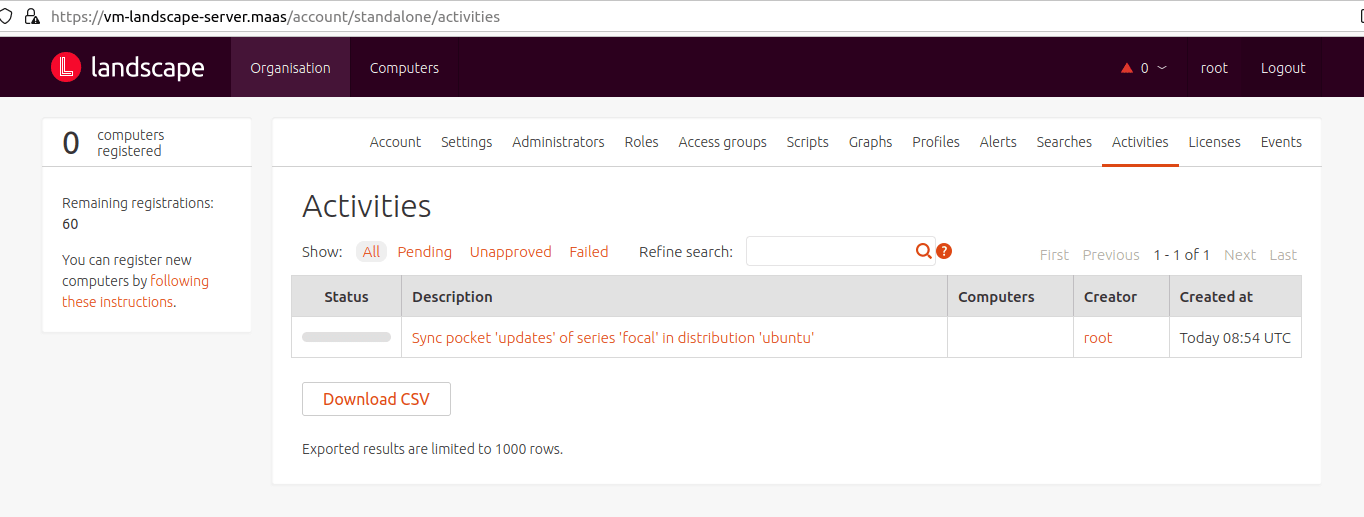
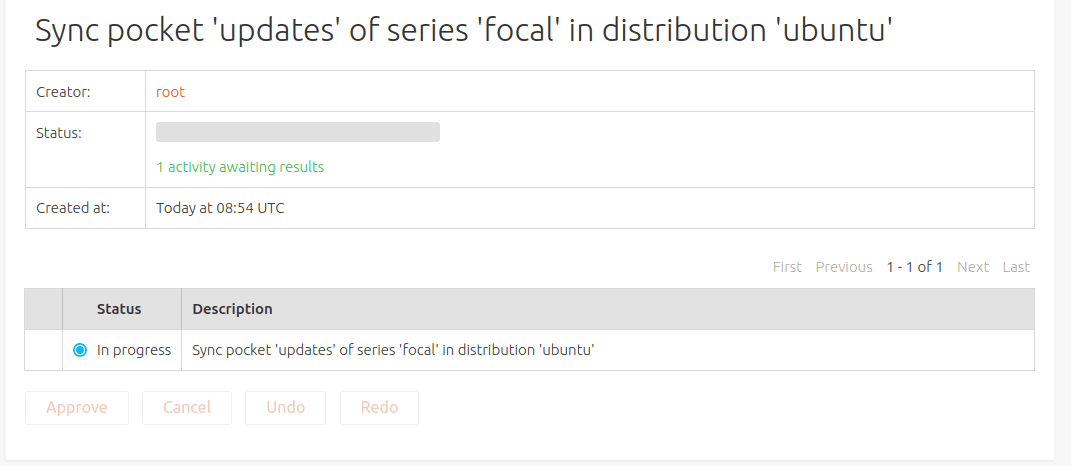
如果发现同步错误,请再次同步,如:
landscape-api sync-mirror-pocket updates focal ubuntu
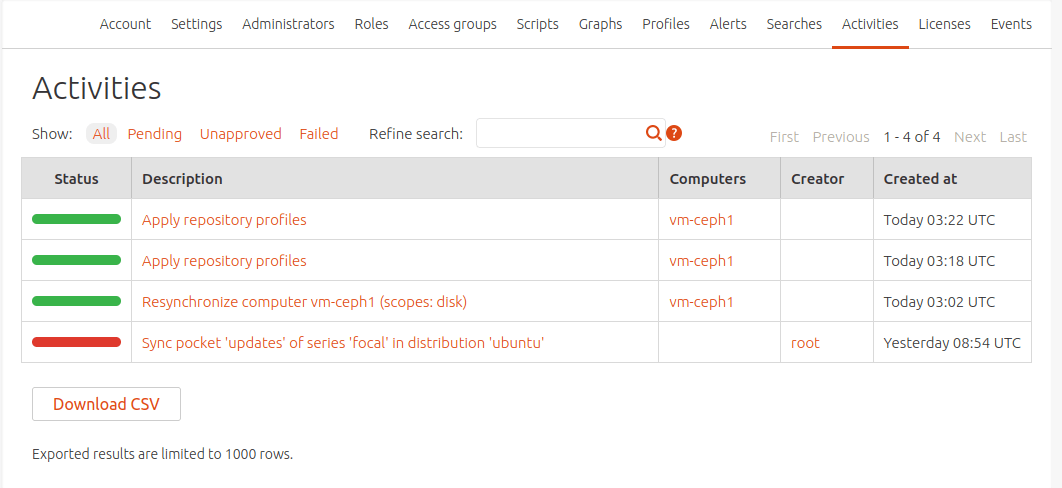
您还可以检查和监控下载,如下所示:

ubuntu@vm-landscape-server:/var/lib/landscape/landscape-repository/standalone/ubuntu$ sudo du -sh pool/
7.2G	pool/
ubuntu@vm-landscape-server:/var/lib/landscape/landscape-repository/standalone/ubuntu$ sudo du -s pool/
7537356	pool/
ubuntu@vm-landscape-server:/var/lib/landscape/landscape-repository/standalone/ubuntu$ sudo du -s pool/
7544152	pool/
ubuntu@vm -landscape-server:/var/lib/landscape/landscape-repository/standalone/ubuntu$
一步一步地同步其余 pockets 如下:
- landscape-api sync-mirror-pocket security focal ubuntu
- landscape-api sync-mirror-pocket release focal ubuntu
注意:根据您的网络下载速度,第一次完全同步需要几十个小时。
本教程由Canonical FE Mao Zhanglei 所撰写。